Case study · 02

Task Board — a kanban with an opinion.

A live product planning tool where every task carries an impact/effort score, a priority matrix shows where the leverage is, and one click gets a ranked plan — or a capacity-budgeted sprint — with the reasoning written out, so you can disagree with it intelligently.

Role
Product, design & build
Type
AI product planning
Stack
React · PostgreSQL · Groq API
Status
Live — open to try
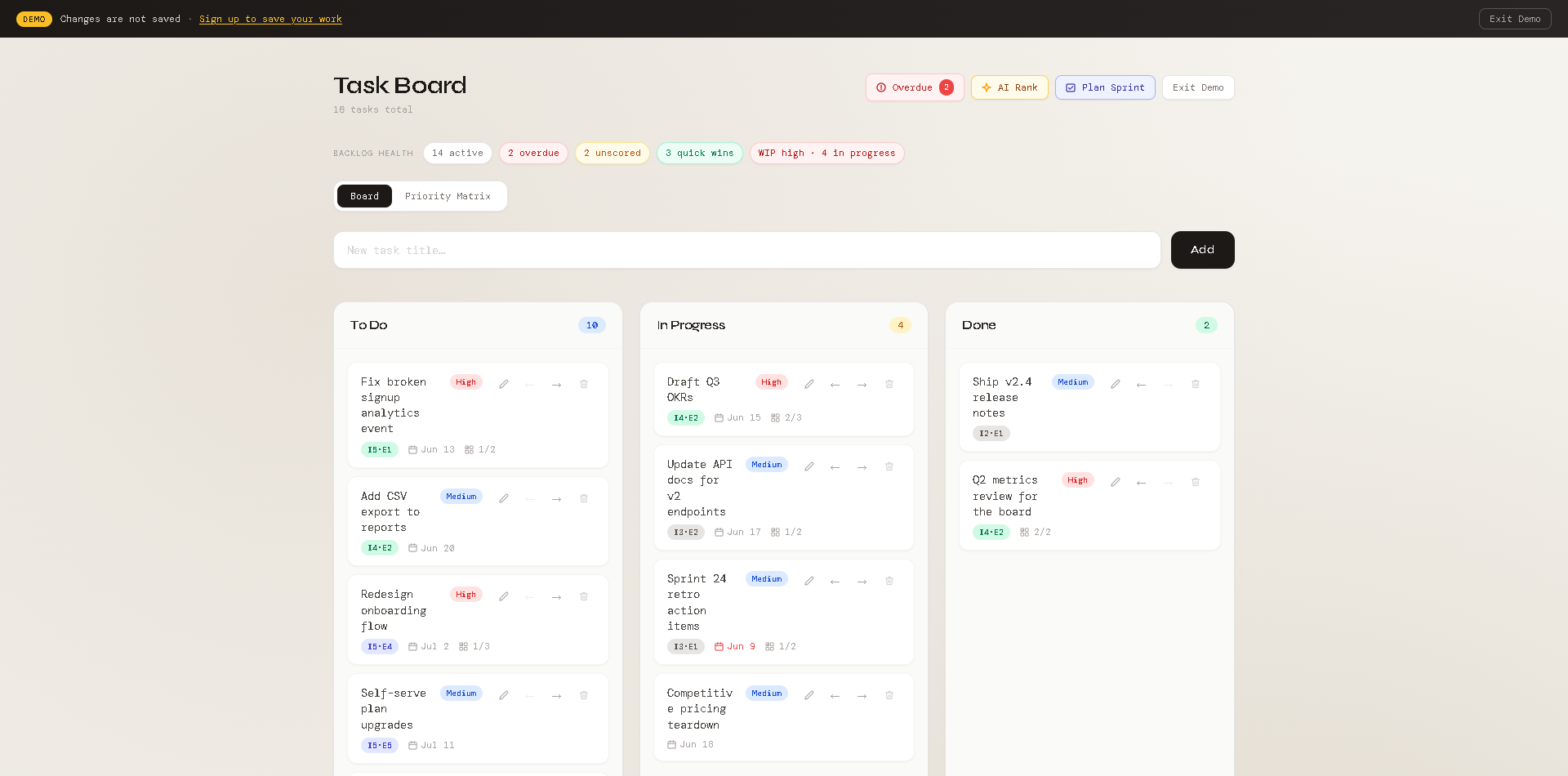
Task Board kanban with backlog health chips, Board and Priority Matrix tabs, impact/effort chips on cards, and AI Rank and Plan Sprint actions
01

Overview

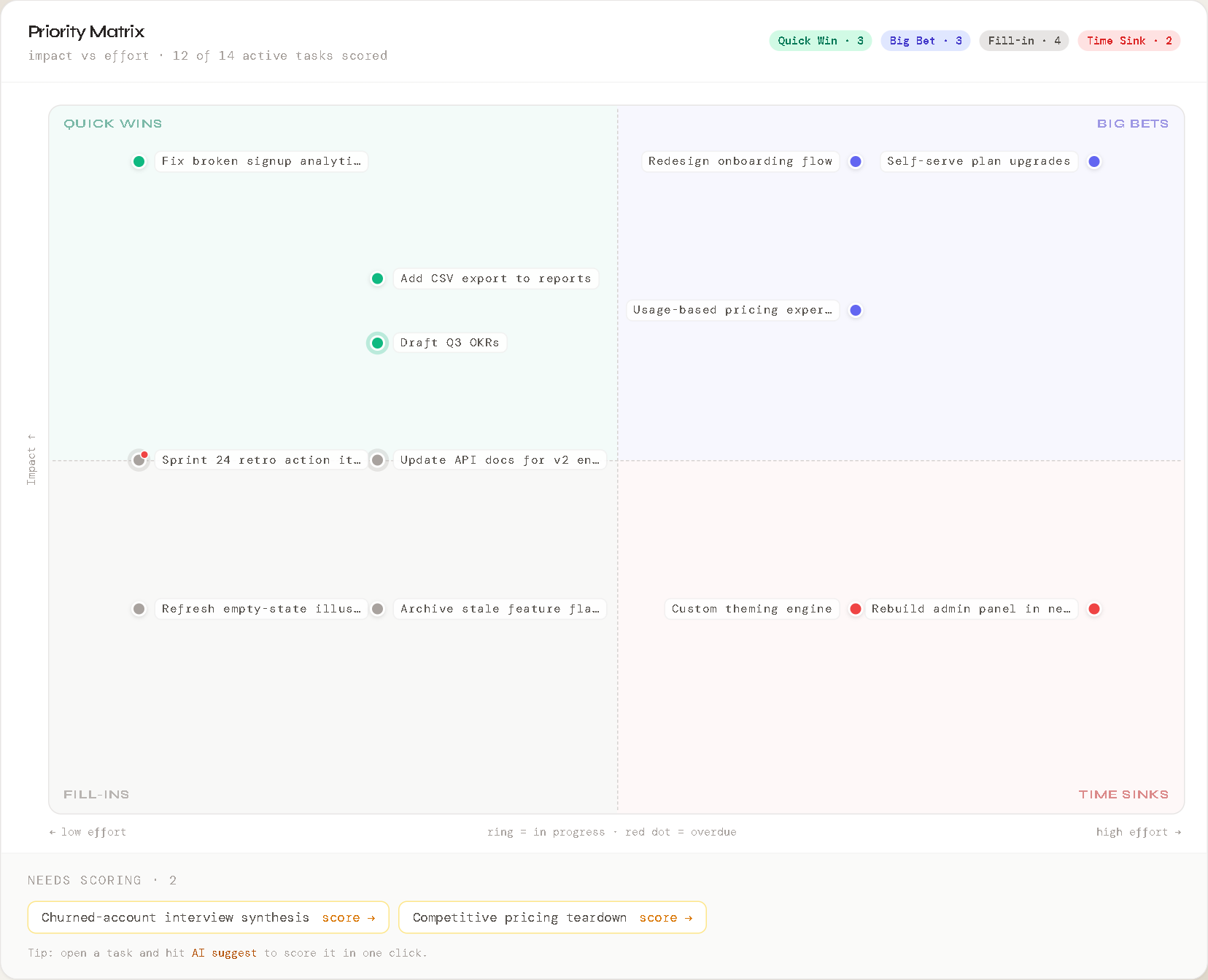
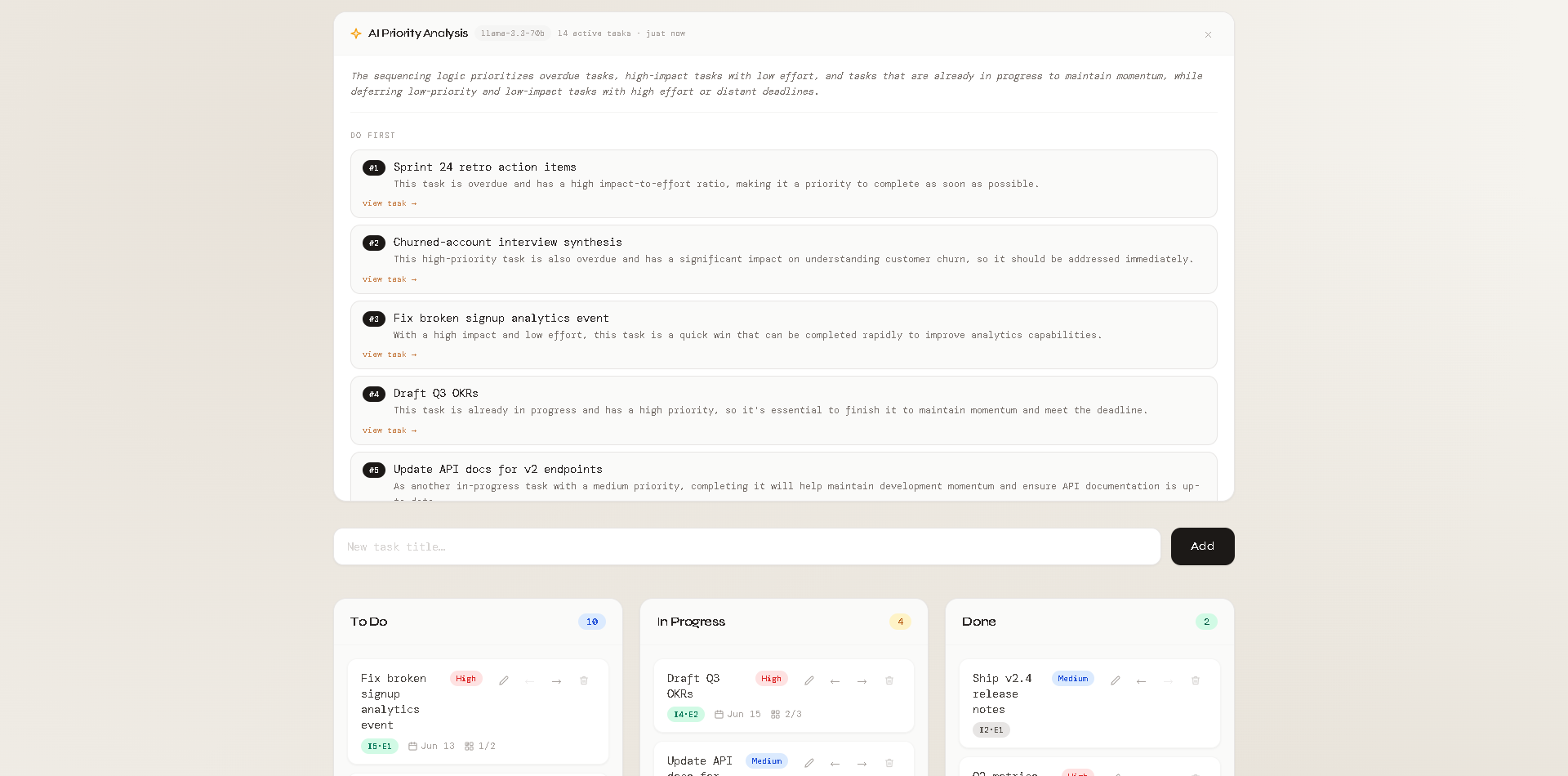
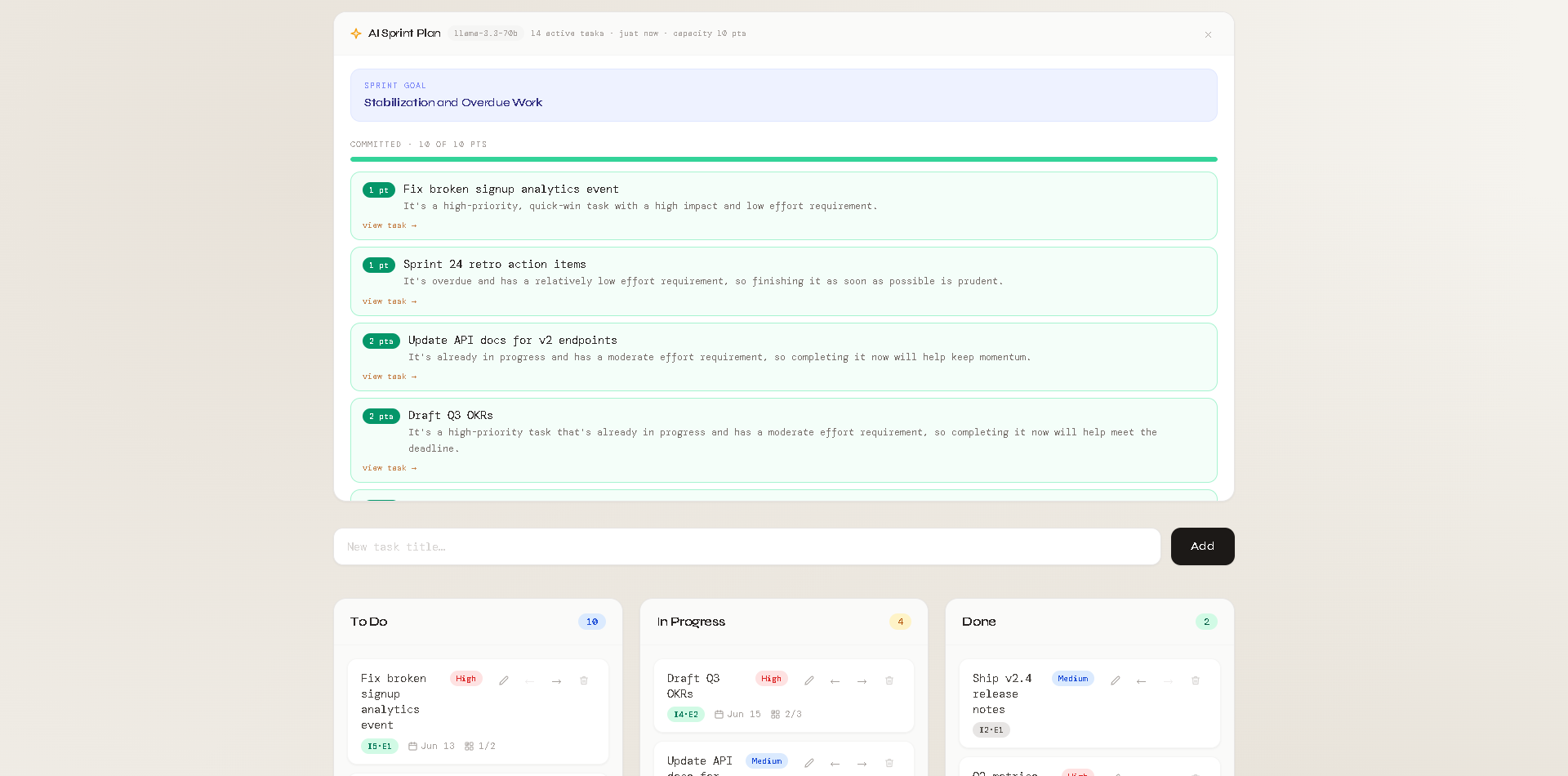
Task Board starts as a familiar three-column kanban — and grows into a planning platform. Every task carries an impact and effort score (set by hand, or suggested by AI with a rationale); a Priority Matrix plots the active board into Quick Wins, Big Bets, Fill-ins, and Time Sinks; AI Rank reads every signal — status, priority, deadlines, subtask progress, scores — and returns a do-first order with a reason per task; and AI Sprint Plan commits work against an effort-point capacity budget, saying out loud what's deferred and why.

It's built to answer the question a PM faces every morning: of everything on this board, what actually deserves the team's time — and what should we say no to?

02

Problem

Kanban boards show status, not sequence. A board can be perfectly organized and still leave the real question unanswered: of everything here, what do I do right now?

Answering that requires weighing several signals at once — priority labels, due dates, what's overdue, what's already mid-flight, how much of each task is done. Humans do this constantly and inconsistently; it's exactly the kind of bounded, multi-factor judgment an AI model can do well if it's given clean structure.

The bet: an AI that ranks five tasks with visible reasoning beats a dashboard that displays fifty signals without any.
03

Product thinking

The workflow had to stay boring. People already know kanban; making them learn a new paradigm to get AI value is a tax most won't pay. So the board itself is deliberately conventional, and the planning layer — scoring, the matrix, ranked analysis, sprint plans — is optional and summonable, never in the way of moving a card.

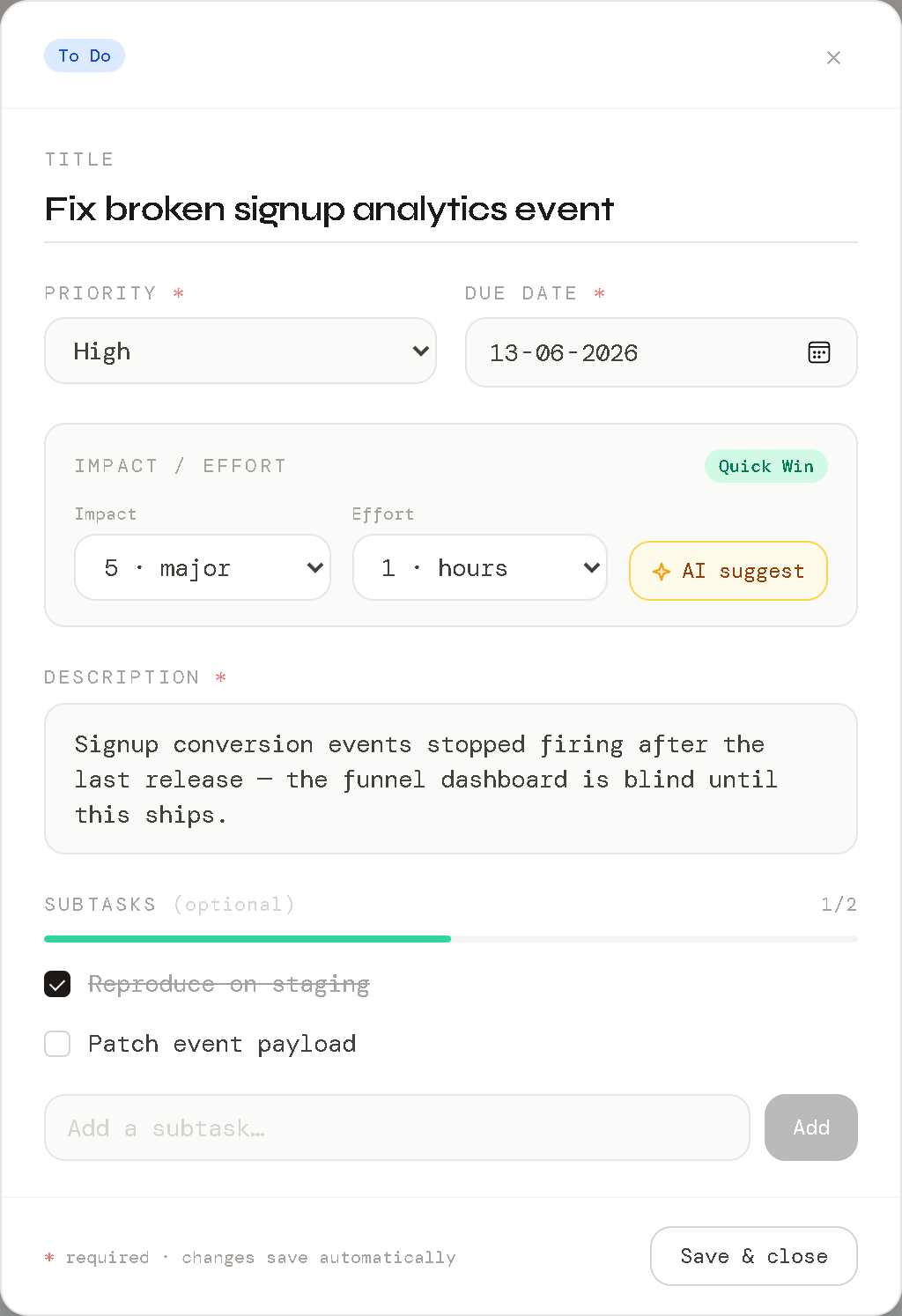
Prioritization needed a framework, not vibes — but a cheap one. Impact and effort (1–5 each) are the two fields a PM can score in seconds and an AI can suggest defensibly; together they're enough to drive the matrix, the value conversation, and the sprint budget.

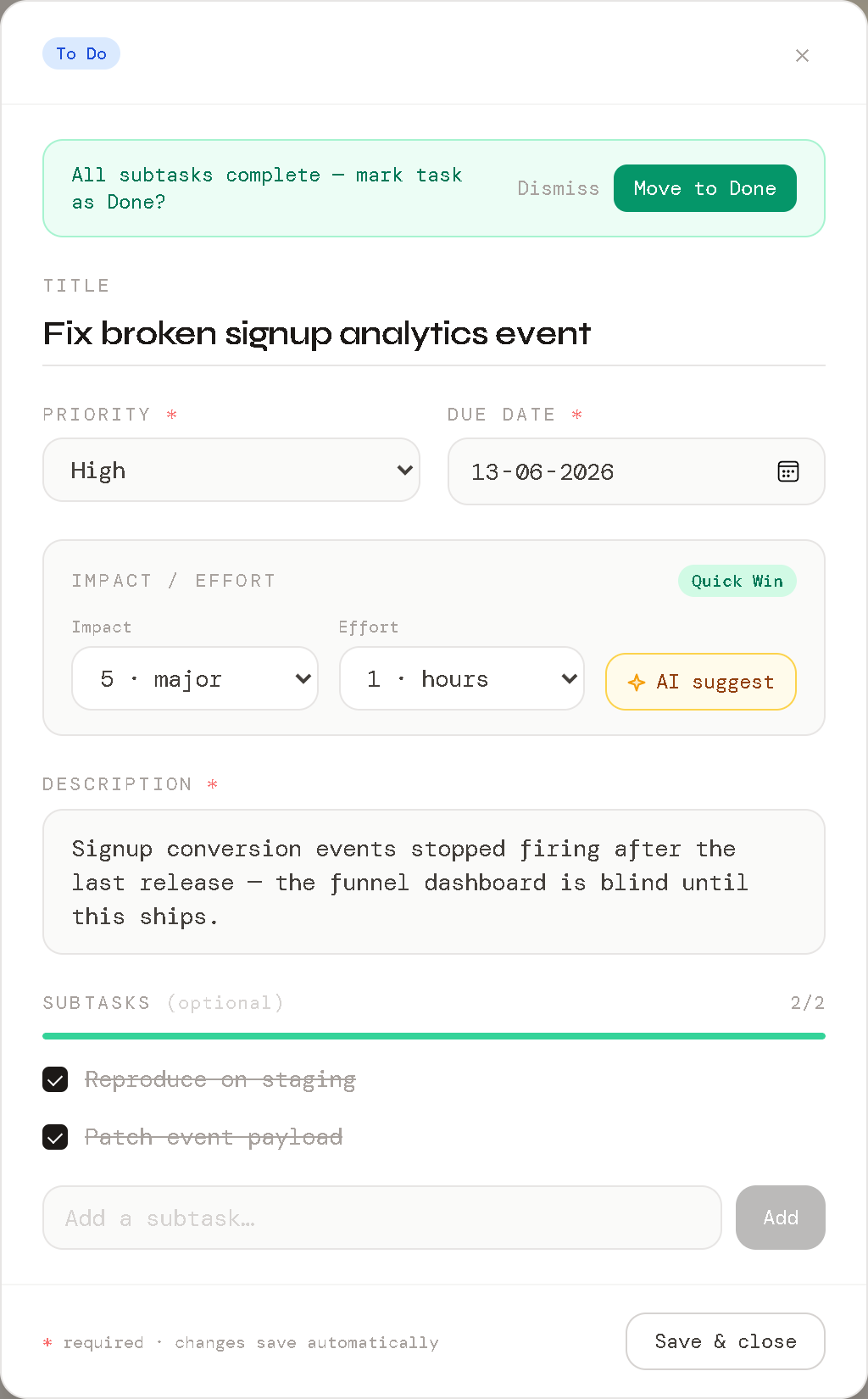
The second principle: the AI reads everything but writes nothing. It ranks and explains; the user moves cards. Small contextual nudges close the loop instead — when every subtask on a card is checked, the product asks one question: "All subtasks complete — mark task as Done?" One tap, user in control.

Subtask progress (1/2, 4/4) was added specifically as model input: a task that's 80% done and overdue should rank differently from one that's untouched and overdue, and the model can only know that if the data structure carries it.
Priority Matrix: impact vs effort quadrants labeled Quick Wins, Big Bets, Fill-ins, Time Sinks, with labeled task dots, legend counts, and a needs-scoring strip
04

Key decisions

Model

Fast inference over frontier reasoning

Ranking a bounded set of structured tasks doesn't need a frontier model. Serving a lightweight model through the Groq API keeps the feature near-instant and near-free — and proved that careful input structure matters more than model size for this class of task.

UX

Reasoning shown in full, per task

The analysis panel doesn't output "1, 2, 3, 4." Each rank carries its why — overdue status, priority, distance to deadline. Users calibrate trust by checking the reasoning against their own.

Interaction

Pull, not push

Prioritization runs only when requested. An AI that constantly reshuffles your board destroys spatial memory; one you summon respects it.

Detail

Completion nudges over automation

Auto-moving completed cards felt efficient and tested badly in my own use — state changing without consent erodes trust. The confirm-prompt pattern kept the speed and the control.

Framework

Impact/Effort over full RICE

Reach and Confidence add ceremony without better decisions at this scale. Two fields keep scoring cheap enough to actually happen — and the matrix only needs two axes to force the trade-off conversation.

Trust

Plans persist — and admit when they're stale

Every analysis is stored with a fingerprint of the board it reasoned over. Move a card, change a score, tick a subtask — the plan flags itself stale and offers a one-click re-run. A plan that doesn't know it's outdated is worse than no plan.

05

Technical architecture

React client

Board, priority matrix, task and subtask views, backlog health, and the analysis panels — matrix rendered with plain positioned HTML, no chart libraries.

Auth & PostgreSQL

Per-user boards behind row-level security; tasks carry status, priority, deadlines, subtasks, and impact/effort scores.

Serialization layer

Board state compiled into a structured prompt: title, priority, status, due date with overdue flags, subtask ratio, and impact/effort quadrant per task.

Groq API inference

Strict-JSON outputs for three jobs — score suggestions, ranked analysis, and sprint plans — parsed and rendered with every item linked back to its source task. Plans persist per user with staleness detection.

flow: board state → serialize full signals → rank / plan with rationale → render → human moves the cards

06

Tradeoffs

Chose

A small, fast model over a frontier one.

Cost

Occasionally blunt phrasing in rationales. Acceptable: the ranking logic stays sound, and the cost/latency profile makes the feature free to use habitually.

Chose

Whole-board analysis instead of per-task scoring.

Cost

Won't scale past a few dozen tasks per call — fine for personal boards, a known rework item before team-scale use.

Chose

A 1–5 integer scale for impact and effort over story points or t-shirt sizes.

Cost

Less granularity per task — accepted, because the matrix and the sprint budget need scores that are cheap to assign and comparable across the whole board. Consistency beats precision for portfolio-level decisions.

07

Screens

08

Learnings

Input structure beats model size

A small model with clean, complete board state outperformed early experiments where a larger model guessed from sparse data. Data modeling is AI product work.

AI features should be summonable, not ambient

The on-demand pattern made the feature feel like a tool rather than a surveillance layer. Users — starting with me — used it more because it ran less.

Boring workflows are the best AI delivery vehicle

Keeping the kanban conventional meant zero onboarding cost for the AI feature. The familiar surface is what made the unfamiliar capability adoptable.

Next case study

Pulse — AI feedback analysis

Feedback in, ranked priorities out.

Read case study →